
Oblivion Desktop · v3.11.0
Connection methods and IP location
Choose a method that works on your network. Psiphon offers a country choice; WARP, Gool and Masque do not. Your public IP can change while its country stays the same.
v3.11.0 settings checked on . The Desktop repository is archived. Project status
WARP, Gool, Psiphon and Masque compared
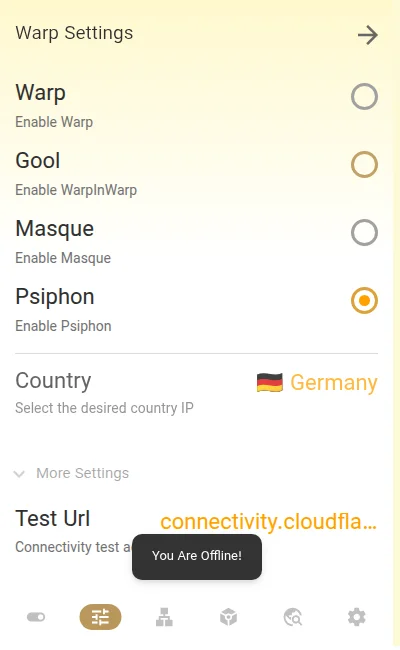
The method is selected under Warp Settings. The README calls Psiphon Cfon; in the English app, its button is labelled Psiphon. Gool means Warp-in-Warp, not a Google service.
On a narrow screen, scroll the table sideways to compare all columns.
| Method | How it connects | Country control |
|---|---|---|
| WARP | A WARP connection through the warp-plus component. | No country selector. The exit IP can still represent your current country. |
| Gool | Two WARP connections chained together: Warp-in-Warp. | No country selector. It can produce a different location; no particular country is guaranteed. |
| Psiphon / Cfon | Psiphon carried over WARP through warp-plus. | The Country list becomes available. Choose a listed country or Random; connection success is not guaranteed. |
| Masque | A Cloudflare MASQUE connection through masque-plus and usque. | No country selector and no promise of a foreign IP. Hidden in Windows ia32 builds. |
Desktop v3.11.0’s build configuration specifies warp-plus 1.2.6 and masque-plus 2.9.0. These are component versions, not alternative Desktop releases. See the component versions, method controls, warp-plus description and Masque-Plus description.
Which method should I try?
Keep a method that already works for your task. There is no tested universal winner for speed or reliability across providers and countries.
- Note your current method, country, network mode and Endpoint, then disconnect.
- Open the Warp tab, or Warp Settings from the menu. Select one alternative method. For a country choice, select Psiphon; to compare connection methods without selecting a country, try WARP, Gool or Masque where available.
- If you use a custom Endpoint and are switching between WARP/Gool/Psiphon and Masque, save its value and choose Default in Scanner Settings → Endpoint before reconnecting. An endpoint for one method may not suit the other. Keep the network mode unchanged and reconnect.
- Open an ordinary website and the service you actually need. Check the IP from the same browser or app that should use Desktop.
If it works: keep the setting that meets your needs. If it fails: disconnect, restore the previous method, country and Endpoint, then reconnect. If every method fails, follow connection troubleshooting; repeatedly changing countries will not diagnose a general connection failure.
How to choose a country with Psiphon
Disconnect, open Warp Settings, select Psiphon, then choose Country and reconnect. Random lets Desktop pick from its country list at connection time. A selected country requests a Psiphon exit there; it does not reserve a fixed IP or guarantee access to every service.
If the selected country will not connect, disconnect and try Random, or return to the country and method that worked before. A greyed-out Country list with WARP, Gool or Masque is expected. Country selection in v3.11.0.
Why does my IP still show my own country?
A different public IP can still be located in the same country. Cloudflare describes WARP as replacing the original IP with a Cloudflare address that represents the user’s approximate location. Seeing Iran, for example, does not by itself prove that WARP failed. Cloudflare’s IP explanation.
The Desktop IP-location guide suggests trying Gool or Psiphon when a different location is needed. Treat that as something to test on your network, not a guaranteed foreign IP. Masque is another connection method, not a country-changing switch.
Check the address, route and service separately
- Different IP, same country: the address changed; the country label alone says nothing about a leak or whether a particular site will accept it.
- Exactly the same public IP: confirm that the tested app is using Desktop. In Proxy mode, the app needs its own proxy configuration. System Proxy depends on the app using the system settings; routing rules or TUN app exclusions can send traffic directly. See network modes and routing rules.
- A website opens, but one service refuses access: the tunnel may work while that destination rejects the connection. Test the actual service after each change; a successful IP lookup is not an access guarantee.
For a browser check, open Cloudflare’s trace page before and after connecting and compare the ip= value. It reports the address seen for that browser request. The colo= value identifies the Cloudflare data centre handling it, not your selected exit country. Trace field explanation. If it reports IPv4 and IPv6 separately, compare like with like. Do not treat a changed IPv4 result as proof that every app and every IPv6 connection takes the same route.
Endpoint, exit IP and network mode are different
- Method
- Chooses the connection path: WARP, Gool, Psiphon or Masque.
- Endpoint
- The remote address and port used to establish the tunnel. Scanning for an endpoint looks for a reachable entry point; it does not select the country websites see.
- Exit IP and country
- The public address a destination sees, and the location its lookup assigns to that address. A country label is not the same thing as a tunnel endpoint.
- Network mode and routing
- Control how apps and destinations reach the connection. None (Proxy), System Proxy and TUN are separate from the method; choosing TUN does not choose a country.
- DNS
- Chooses how names are resolved. Changing a resolver such as 1.1.1.1 does not select an exit country or replace the connection method.
- Local proxy port
- The listening port on your computer, normally
127.0.0.1:8086with default settings. This is neither a public exit IP nor a remote endpoint.
See the Desktop network controls and connection arguments. When comparing methods, preserve your existing endpoint setting so you can restore it; an endpoint intended for one method is not automatically suitable for another.
Will a foreign IP unlock ChatGPT, Netflix or another service?
There is no blanket guarantee. A service can apply its own location and access restrictions even when the connection works. Cloudflare explicitly says WARP is not a tool for choosing another country, and notes compatibility problems with some location-dependent services. WARP’s limits and known issues.
A Psiphon country choice also does not promise a permanent IP. Psiphon explains that addresses can change when its servers change. This is general Psiphon behaviour, not a promise about the availability of any country in Desktop. Psiphon’s IP-address FAQ.
WARP+, warp-plus and the missing License field
warp-plus is the component Desktop uses for WARP, Gool and Psiphon. WARP+ is Cloudflare’s paid service. The similar names do not mean you need a paid subscription to use Desktop. Cloudflare’s WARP+ explanation.
The License tab was removed in v2.45.0. Desktop v3.11.0 still has no visible License entry, and its connection code disables forwarding the key. Old key-entry tutorials are not current instructions. Buying WARP+ does not add a country selector to this Desktop interface.
What about Zero Trust, direct Psiphon or MASQUE + Psiphon?
The v3.11.0 interface has no Zero Trust organisation sign-in or enrolment field. For an organisation-managed connection, use its administrator’s instructions for the Cloudflare One Client.
Desktop’s Psiphon option runs over WARP. Its method control selects one method at a time; it does not offer direct Psiphon, MASQUE + Psiphon, or a bootstrap/upstream proxy setting. Features or requests in related clients do not establish support here. Likewise, Aether engines from the separate Oblivion project are not Desktop 3.11.0 methods. Desktop method selection and core launch code.